Galeria widgetów

⚠️ Strona demonstracyjna — dane nie odzwierciedlają prawdziwych wpłat. Przywracanie ustawień do domyślnych odbywa się o pełnych godzinach. Panel administracyjny oraz dotacje możliwe do wykonania pod adresem: donationapp.very-code.com

🎨 Galeria widgetów DonationApp

Poniżej zaprezentowane są zrzuty ekranów wszystkich widgetów DonationApp dostępnych w pluginie WordPress. Każdy widget pokazany jest w dwóch motywach: jasnym i ciemnym. Przełącznik motywu i języka dostępny jest w prawym dolnym rogu na każdej stronie demo.


⚠️ Demo site — data does not reflect real donations. Settings are reset to defaults at the top of every hour. Administration panel and donation submissions available at: donationapp.very-code.com

🎨 DonationApp Widget Gallery

Below you can see screenshots of all DonationApp widgets available in the WordPress plugin. Each widget is shown in two themes: light and dark. The theme and language toggle is available in the bottom-right corner on every demo page.


📊 Statystyki darowizn — shortcode natywny

Podsumowanie wpłat w podziale na okresy. Renderowane bezpośrednio przez WordPress (bez iframe). Shortcode: [donationapp_stats]


📊 Donation Statistics — native shortcode

Summary of donations broken down by period. Rendered server-side by WordPress (no iframe). Shortcode: [donationapp_stats]

☀️ Motyw jasny (PL)


☀️ Light theme (PL)

Statystyki darowizn — motyw jasny

🌙 Motyw ciemny (EN)


🌙 Dark theme (EN)

Donation Statistics — dark theme

📋 Lista darczyńców — shortcode natywny

Stronicowana tabela ostatnich dotacji z paginacją AJAX. Shortcode: [donationapp_stats view="donations"]


📋 Donors List — native shortcode

Paginated table of recent donations with AJAX pagination. Shortcode: [donationapp_stats view="donations"]

☀️ Motyw jasny (PL)


☀️ Light theme (PL)

Lista darczyńców — motyw jasny

🌙 Motyw ciemny (EN)


🌙 Dark theme (EN)

Donors List — dark theme

🔢 Licznik statystyk — widget embed

Kompaktowy widget z najważniejszymi statystykami. Osadzany jako iframe. Shortcode: [donationapp_embed widget="stats" theme="light" lang="auto" goal="1"]


🔢 Stats Counter — embed widget

Compact widget with key statistics. Embedded as iframe. Shortcode: [donationapp_embed widget="stats" theme="light" lang="auto" goal="1"]

☀️ Motyw jasny


☀️ Light theme

Licznik statystyk — motyw jasny

🌙 Motyw ciemny


🌙 Dark theme

Stats Counter — dark theme

💚 Przycisk dotacji — widget embed

Przycisk CTA zachęcający do wpłaty. Shortcode: [donationapp_embed widget="donation" theme="light" lang="auto"]


💚 Donate Button — embed widget

CTA button encouraging donations. Shortcode: [donationapp_embed widget="donation" theme="light" lang="auto"]

☀️ Motyw jasny


☀️ Light theme

Przycisk dotacji — motyw jasny

🌙 Motyw ciemny


🌙 Dark theme

Donate Button — dark theme

📝 Formularz dotacji — widget embed

Pełny formularz do składania darowizn. Shortcode: [donationapp_embed widget="form" theme="light" lang="auto" height="820"]


📝 Donation Form — embed widget

Full donation submission form. Shortcode: [donationapp_embed widget="form" theme="light" lang="auto" height="820"]

☀️ Motyw jasny


☀️ Light theme

Formularz dotacji — motyw jasny

🌙 Motyw ciemny


🌙 Dark theme

Donation Form — dark theme

🏆 Tablica dotacji — widget embed

Publiczna tablica najnowszych darczyńców. Shortcode: [donationapp_embed widget="donations" theme="light" lang="auto" limit="10" cols="2"]


🏆 Donors Board — embed widget

Public leaderboard of recent donors. Shortcode: [donationapp_embed widget="donations" theme="light" lang="auto" limit="10" cols="2"]

☀️ Motyw jasny


☀️ Light theme

Tablica dotacji — motyw jasny

🌙 Motyw ciemny


🌙 Dark theme

Donors Board — dark theme

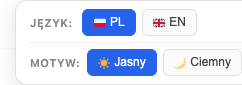
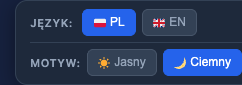
🔄 Przełącznik motywu i języka

Na każdej stronie demo w prawym dolnym rogu dostępny jest pływający przełącznik. Pozwala zmienić motyw (jasny/ciemny) oraz język (PL/EN) bez przeładowania strony. Wszystkie widgety — zarówno natywne shortcode’y, jak i embedy iframe — reagują natychmiast.


🔄 Theme & Language Toggle

On every demo page, a floating toolbar is available in the bottom-right corner. It allows switching the theme (light/dark) and language (PL/EN) without page reload. All widgets — both native shortcodes and iframe embeds — react instantly.

☀️ Toolbar — motyw jasny


☀️ Toolbar — light theme

Toolbar — light

🌙 Toolbar — motyw ciemny


🌙 Toolbar — dark theme

Toolbar — dark

⚙️ Konfiguracja pluginu w panelu WordPress

Poniżej widoczna jest strona konfiguracyjna pluginu w panelu WordPress (Ustawienia → DonationApp Stats). Tutaj ustawia się bazowy URL API, skrypt embed, motyw natywnych shortcode’ów i strefę czasową.


⚙️ Plugin Configuration in WordPress Admin

Below you can see the plugin settings page in WordPress Admin (Settings → DonationApp Stats). Here you configure the API base URL, embed script, native shortcode theme and timezone.

DonationApp Stats — WordPress Admin Settings

📖 Pomoc — Jak korzystać z pluginu

Instalacja

  1. Pobierz plugin ze strony integracji DonationApp (plik ZIP).
  2. W panelu WordPress: Wtyczki → Dodaj wtyczkę → Wyślij na serwer → wybierz ZIP.
  3. Aktywuj wtyczkę.
  4. Przejdź do Ustawienia → DonationApp Stats i ustaw bazowy URL API.

Shortcodes — widgety embed (iframe)

Shortcode [donationapp_embed] osadza widgety jako iframe:

[donationapp_embed widget="stats" theme="light" lang="auto" goal="1"]
[donationapp_embed widget="form" theme="dark" lang="pl" height="820"]
[donationapp_embed widget="donations" theme="light" limit="10" cols="2"]
[donationapp_embed widget="donation" theme="dark" title="Wesprzyj nas!"]

Atrybuty: widget (wymagany: stats/form/donations/donation), theme (light/dark), lang (pl/en/auto), height (px), goal (1), limit (1-50), cols (1-3), title, description, button_text.

Shortcodes — natywne (renderowane serwerowo)

[donationapp_stats]              — tabela podsumowań statystyk
[donationapp_stats view="donations"]  — stronicowana lista dotacji

Tłumaczenia

Plugin automatycznie wykrywa język WordPress. Widgety embed z lang="auto" wyświetlą się w odpowiednim języku. Można wymusić język: lang="pl" lub lang="en". Przełącznik w prawym dolnym rogu zmienia język na frontendzie bez przeładowania strony.

Treść wielojęzyczna — shortcode

Aby wyświetlać różne opisy w zależności od wybranego języka:

[donationapp_lang lang="pl"]Tekst po polsku[
] [donationapp_lang lang="en"]]English text[[/donationapp_lang]

Przełącznik języka automatycznie przełącza widoczność tych bloków.

[/donationapp_lang]

📖 Help — How to Use the Plugin

Installation

  1. Download the plugin from the DonationApp Integrations page (ZIP file).
  2. In WordPress Admin: Plugins → Add Plugin → Upload Plugin → select the ZIP.
  3. Activate the plugin.
  4. Go to Settings → DonationApp Stats and set the API Base URL.

Shortcodes — embed widgets (iframe)

The [donationapp_embed] shortcode embeds widgets as iframes:

[donationapp_embed widget="stats" theme="light" lang="auto" goal="1"]
[donationapp_embed widget="form" theme="dark" lang="en" height="820"]
[donationapp_embed widget="donations" theme="light" limit="10" cols="2"]
[donationapp_embed widget="donation" theme="dark" title="Support us!"]

Attributes: widget (required: stats/form/donations/donation), theme (light/dark), lang (pl/en/auto), height (px), goal (1), limit (1-50), cols (1-3), title, description, button_text.

Shortcodes — native (server-rendered)

[donationapp_stats]              — statistics summary table
[donationapp_stats view="donations"]  — paginated donation list

Translations

The plugin auto-detects WordPress language. Embed widgets with lang="auto" display in the matching language. Force a language with lang="pl" or lang="en". The toolbar in the bottom-right corner switches language on the frontend without reloading.

Bilingual content — shortcode

To display different descriptions based on the selected language:

[donationapp_lang lang="pl"]Polish text[
] [donationapp_lang lang="en"]]English text[[/donationapp_lang]

The language toggle automatically switches visibility of these blocks.

[/donationapp_lang]

💡 Generator kodu widgetów: Panel integracji. Pełna dokumentacja: Pomoc DonationApp.


💡 Widget code generator: Integrations panel. Full documentation: DonationApp Help.